Slate Theme for MyBB
MYBB
THEME
free
Calm slate-dark theme for MyBB 1.8, built on the stock template set so a version bump cannot break it.
A dark theme for MyBB 1.8 that works with the templates you already have. Slate surfaces, one blue accent, dark inputs, readable quotes and code blocks. The three places most dark themes leave a white box — the post author panel, the post controls row and the footer band — are covered here.
Preview
 1 / 1
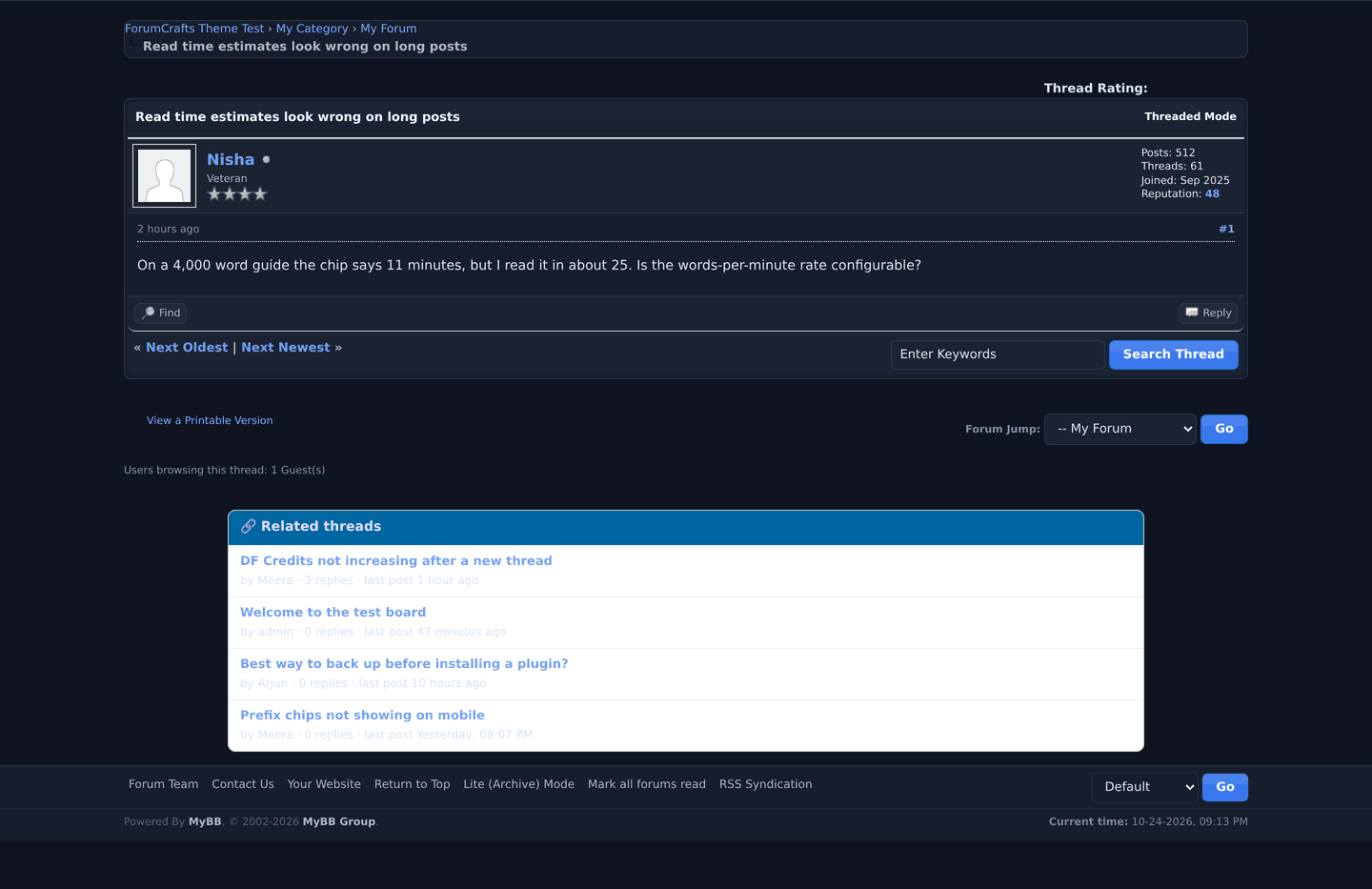
Slate in place on MyBB 1.8.38 - thread view, postbit and quick reply.⤢ Tap image for full size
What's included
- A calm slate-dark MyBB 1.8 theme built on the stock template set, so a version bump cannot break its structure.
- One blue accent, dark inputs, and readable quotes and code blocks.
- Covers the five places dark themes usually leave a white box: post author panel, post controls, postbit buttons, quote block and quote header.
- Ships as colour variants for tiered pricing — same templates, different palette.
At a glance
| Platform | MyBB theme |
|---|---|
| Latest version | v1.0.0 |
| Download size | 9.9 KB |
| Released | 25 Oct 2026 |
| Downloads | 1 |
| Access | Free — sign in to download |
| Install | Admin CP → Templates and Style → Import a Theme |
| Stylesheet | one overlay on the stock global.css |
| Database | none — a theme stores nothing |
| Files | 3 in the archive |
Requirements
- MyBB 1.8.x — the XML declares 1838.
Checksum
Verify your download before you upload it to your board.
acae77149d863be01dd58b08a1816e3a89aabca5f325701c11edb03d170ec0feInstall it
1. Back up the board: database and files.
2. Admin CP, then Templates and Style, then Themes, then Import a Theme.
3. Choose df-slate.xml and tick "Import Stylesheets".
4. Open the theme and click "Force on Users".
5. Hard-refresh once: MyBB caches compiled CSS under cache/themes/.
To remove it: delete the theme and set your previous theme back as default. Nothing in the database depends on it.
The XML declares version 1838. On an older 1.8 build tick "Ignore Version Compatibility" - nothing in the stylesheet is version specific.
2. Admin CP, then Templates and Style, then Themes, then Import a Theme.
3. Choose df-slate.xml and tick "Import Stylesheets".
4. Open the theme and click "Force on Users".
5. Hard-refresh once: MyBB caches compiled CSS under cache/themes/.
To remove it: delete the theme and set your previous theme back as default. Nothing in the database depends on it.
The XML declares version 1838. On an older 1.8 build tick "Ignore Version Compatibility" - nothing in the stylesheet is version specific.
Questions people ask
Does it create database tables?
No. It reads what the platform already stores, so there is nothing to migrate or clean up.
Does it edit templates or core files?
No. It runs from hooks, so no core file is modified.
How do I check the file I downloaded?
Every release page prints a SHA-256 checksum. Hash the archive locally and compare — if the two differ, the download is damaged, not the release.
How are updates delivered?
Each version is its own release on this page with a changelog, and the older archive stays available. Install the new one over the old one; your settings and data stay where they are.
All releases
| Version | Released | Size | Downloads | Changelog |
|---|---|---|---|---|
| v1.0.0 latest | 25 Oct 2026 | 9.9 KB | 1 | - First release. Base: MyBB 1.8.38 default global.css, unmodified, plus the ForumCrafts overlay. Verified on a clean MyBB 1.8.38 board: import, force-on-users, board index and thread view all render dark with the post author panel, post controls and quote boxes covered. |
Ratings & reviews
No ratings yet — the first one will be real, not seeded
Ratings come from registered members only — that is the whole point.
Sign in to rateFree account, 20 seconds. Create one