FC Portal Pro - MyBB Plugin
Premium MyBB portal system with drag-and-drop widgets for a custom homepage.
Choose from nine widget types: latest threads, top posters, forum statistics, news & announcements, hottest threads, new members, polls, calendar events, and custom HTML. Arrange them in a responsive grid with full, half, or third-width columns. Toggle visibility, set sort order, and limit list items per widget.
The portal includes a built-in news system with BBCode support, an online users counter, and a clean modern template with CSS included. Six default widgets are pre-installed so the portal looks great the moment you enable it.
When you need the normal forum index back, just toggle the portal off in ACP settings — the original index returns instantly. Everything is reversible, nothing is lost.
Preview
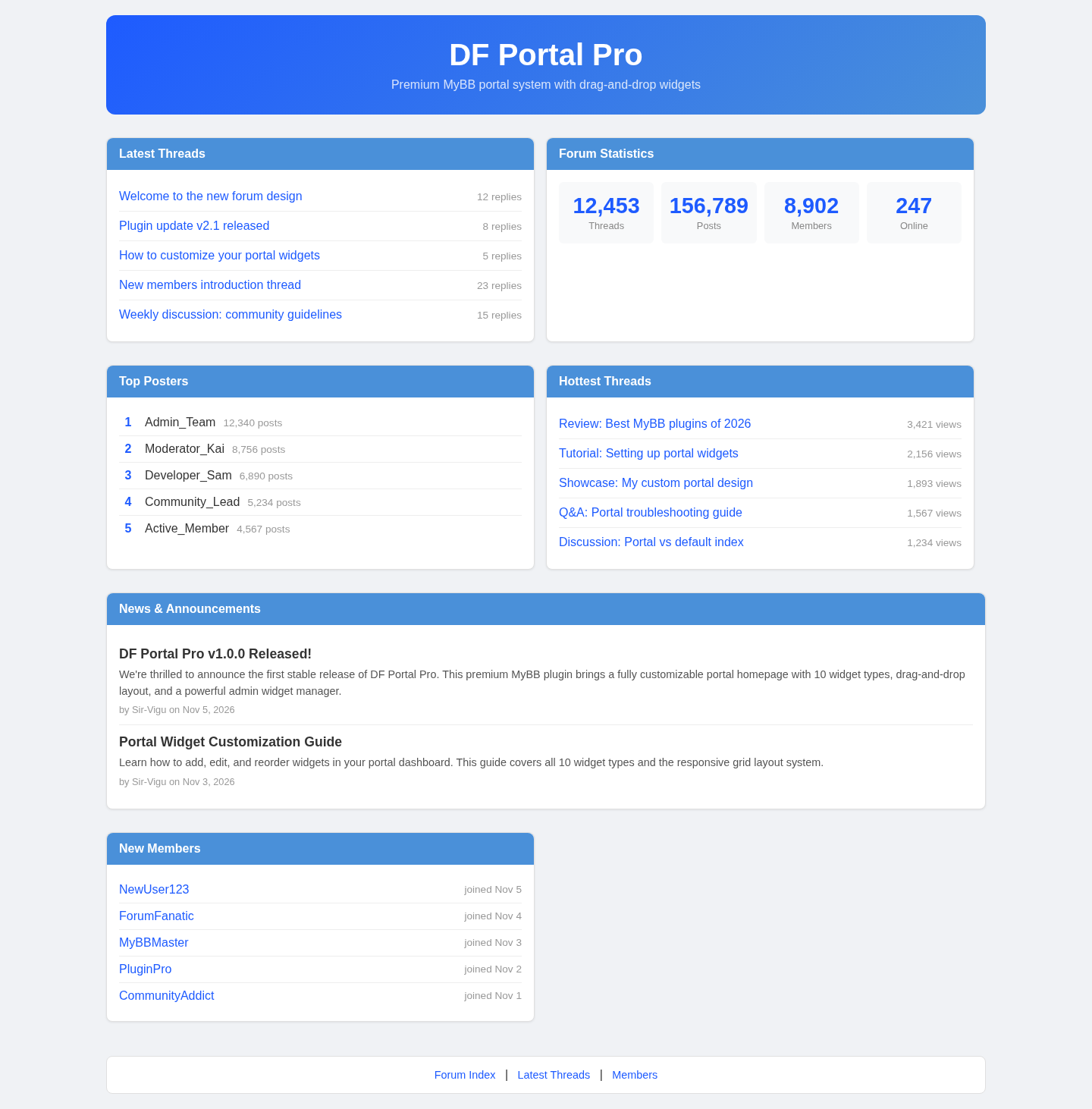 1 / 3
What's included
- Nine widget types: Latest Threads, Top Posters, Forum Statistics, News & Announcements, Hottest Threads, New Members, Poll, Calendar, Custom HTML
- Responsive 3-column grid with full, half, and third-width widget options
- Admin panel for widget management — add, edit, delete, reorder, toggle visibility
- Portal enable/disable toggle in ACP settings
- Six default widgets pre-installed — portal looks great immediately
- Built-in news and announcements system with BBCode support
- Online users count display in the statistics widget
- Per-widget item limit for list-type widgets
- Clean modern template with CSS included — no external dependencies
- Three database tables, all dropped cleanly on uninstall
- Premium support and updates included
At a glance
| Platform | MyBB plugin |
|---|---|
| Latest version | v1.0.1 |
| Download size | 11.8 KB |
| Released | 5 Nov 2026 |
| Downloads | 2 |
| Access | Licence required |
| Compatibility | MyBB 1.8.x |
| Files | 8 — dfportal.php + dfportal/ directory (db, widgets, portal, admin, hooks, templates, language) |
| Database | 3 tables (dfportal_widgets, dfportal_stats, dfportal_news), all dropped on uninstall |
| Settings | 2 (portal enable toggle, default widget limit) |
| Templates | 1 (dfportal_page), installed and removed automatically |
| Widget types | 9 |
| Default widgets on install | 6 |
| External dependencies | none |
| Mobile responsive | yes |
Requirements
- MyBB 1.8.0 or newer (1.8.38 tested)
- PHP 7.2+ (8.x fine)
- MySQL 5.5+ or MariaDB 10.0+
- A database account that can CREATE TABLE
- Premium licence key from ForumCrafts
Checksum
Verify your download before you upload it to your board.
c5132df0a24dc9f872756c8ebce6a12d588853f02279b571c5a19f9774abb163Install it
2. ACP → Plugins & Styles → Plugin Manager → Install Plugin
3. Browse to dfportal.php and click Install Now
4. The plugin creates 3 database tables, adds settings, creates 6 default widgets, and installs the portal template
5. Activate the plugin in the Plugin Manager
6. ACP → Settings → DF Portal Pro: Enable Portal → Yes → Save
7. ACP → Plugins & Styles → DF Portal Pro → configure widgets → Save Widgets
No template edits required. No cron job. Uninstalls cleanly.
Questions people ask
What does DF Portal Pro do?
It replaces your MyBB forum index with a customizable portal homepage built from widgets. Instead of the default thread list, visitors see a grid of widgets — latest threads, top posters, forum stats, news, and more — all configured from the ACP.
Do I need to edit templates?
No. The portal template is installed automatically when you install the plugin. All widget content is rendered programmatically. If you want to customize the visual style, you can edit the dfportal_page template in the ACP, but it works out of the box.
How do I configure widgets?
Go to ACP → Plugins & Styles → DF Portal Pro. You'll see a widget management screen where you can change sort order, titles, types, widths, limits, and visibility for each widget. Use the Add New Widget form to add more. Click Save Widgets when done.
Can I turn the portal off?
Yes. Go to ACP → Settings → DF Portal Pro: Enable Portal and set it to No. Your forum index returns to the default MyBB layout immediately. Nothing is deleted — you can re-enable it any time.
How do I add news and announcements?
Portal news are stored in the dfportal_news database table. You can insert entries directly, or use a Custom HTML widget to display announcements. News entries support BBCode formatting.
What happens on uninstall?
All three database tables are dropped, portal settings are removed, the template is deleted, and the portal homepage reverts to the default MyBB index. The plugin leaves no trace.
Is this a subscription or a one-time purchase?
One-time purchase with a per-site licence. You get all current and future updates for the product. Premium support is included.
Which widget types are available?
Nine types: Latest Threads, Top Posters, Forum Statistics, News & Announcements, Hottest Threads, New Members, Poll, Calendar, and Custom HTML. List widgets support a configurable item limit. Width can be set to full, half, or third.
All releases
| Version | Released | Size | Downloads | Changelog |
|---|---|---|---|---|
| v1.0.1 latest | 05 Nov 2026 | 11.8 KB | 2 | - Fixed function name mismatches in dfportal.php (install/uninstall templates)\n- No other changes from v1.0.0 |
| v1.0.0 | 05 Nov 2026 | 11.4 KB | 1 |
Ratings & reviews
Ratings come from registered members only — that is the whole point.
Sign in to rateFree account, 20 seconds. Create one