FC Analytics Dashboard for WordPress
WORDPRESS
PLUGIN
$7.99
Real-time traffic, engagement, and growth analytics for WordPress.
Real-time traffic, engagement, and growth analytics for WordPress sites. Track visitors, top pages, referrers, and engagement without Google Analytics.
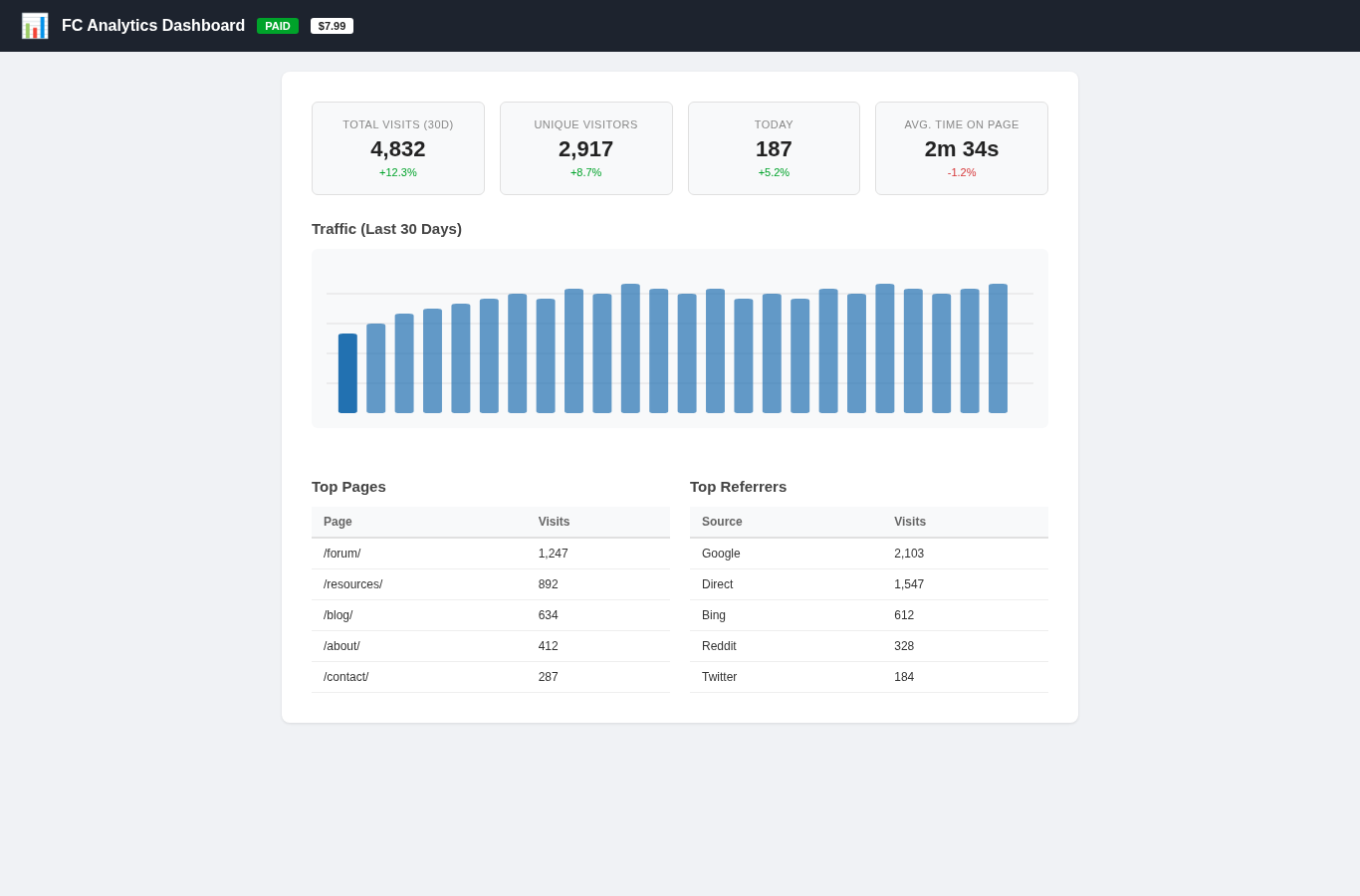
The dashboard shows 30-day traffic trends with a visual chart, unique visitor counts by IP, top pages by popularity, and top referrers. Today vs. yesterday comparisons show immediate growth trends. Common search engine bots are filtered out automatically.
Data is stored locally in WordPress transients with a configurable retention period (default 30 days). No external services, no API keys, no data leaving your server. Fully GDPR compliant by design.
The dashboard shows 30-day traffic trends with a visual chart, unique visitor counts by IP, top pages by popularity, and top referrers. Today vs. yesterday comparisons show immediate growth trends. Common search engine bots are filtered out automatically.
Data is stored locally in WordPress transients with a configurable retention period (default 30 days). No external services, no API keys, no data leaving your server. Fully GDPR compliant by design.
Preview
 1 / 1
Analytics Dashboard with 30-day chart, stats cards, top pages and referrers⤢ Tap image for full size
What's included
- 30-day traffic chart with daily visitor counts; Unique visitor tracking by IP; Top pages and top referrers breakdown; Today vs. yesterday comparison; Bot traffic filtering; Customizable data retention; CSV export; No external services; GDPR compliant
At a glance
| Platform | WordPress plugin |
|---|---|
| Latest version | v1.0.0 |
| Download size | 45.2 KB |
| Released | 6 Nov 2026 |
| Downloads | 0 |
| Access | Licence required |
| Compatibility | WordPress 4.9+; Files: fc-analytics-dashboard.php + assets/; Settings: 2; Cron: Daily cleanup; Database: None (transients); External dependencies: none |
Requirements
- WordPress 4.9 or newer; PHP 7.2+
Checksum
Verify your download before you upload it to your board.
2ed5ae90268b0eec3d8ce38498f540e0f6d4e5810656e998e42350a983282cb9Install it
1. Download fc-analytics-dashboard-wordpress-1.0.0.zip
2. Extract the zip
3. Upload to /wp-content/plugins/
4. Go to WordPress Admin → Plugins → Activate
5. Go to Admin → FC Analytics to view dashboard
2. Extract the zip
3. Upload to /wp-content/plugins/
4. Go to WordPress Admin → Plugins → Activate
5. Go to Admin → FC Analytics to view dashboard
Questions people ask
Q: Do I need Google Analytics for this?
A: No. FC Analytics Dashboard is completely self-contained.
Q: How long is data retained?
A: Default is 30 days, configurable up to 90 days.
Q: Does it track bots?
A: Yes. Common search engine bots are filtered out.
Q: Can I export the data?
A: Yes. All data can be exported as CSV.
Q: Is it GDPR compliant?
A: Yes. All data stays on your server.
All releases
| Version | Released | Size | Downloads | Changelog |
|---|---|---|---|---|
| v1.0.0 latest | 06 Nov 2026 | 45.2 KB | 0 | Initial release of FC Analytics Dashboard for WordPress. |
Ratings & reviews
No ratings yet — the first one will be real, not seeded
Ratings come from registered members only — that is the whole point.
Sign in to rateFree account, 20 seconds. Create one
More WordPress plugins
Reading Progress Plugin for WordPress
A scroll progress bar and an honest reading-time estimate, with no jQuery and no external…
Redirect Manager Plugin for WordPress
301 and 302 redirects with a hit counter, a 404 log and search-and-replace over old URLs…
FC Image Optimizer
Automatic image compression, WebP conversion, and lazy loading for WordPress. Save…
FC Broken Link Checker for WordPress
Scan your WordPress site for broken links and get a dashboard report with one-click fix…