FC Image Optimizer
Automatic image compression, WebP conversion, and lazy loading for WordPress. Save bandwidth, speed up pages, improve SEO.
No API key, no account, no external service. The plugin uses your server's GD or Imagick library to compress images locally. Install it, configure your preferences, and forget about it — every new upload is automatically optimized.
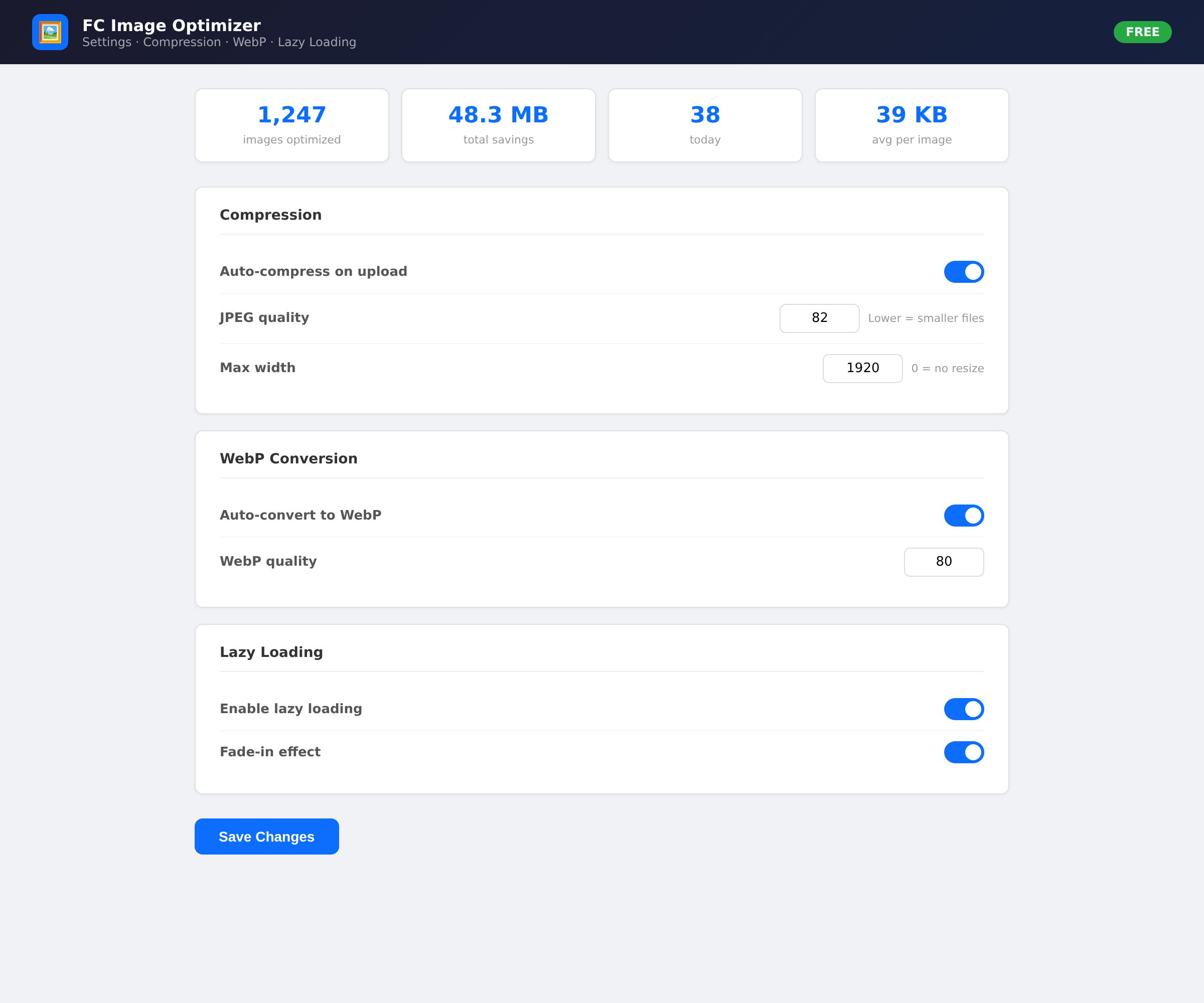
Compress at a quality you choose (default 82% — visually lossless with significant size reduction). Generate WebP versions alongside originals and serve them to supported browsers. Strip EXIF and IPTC data for privacy and size savings. Lazy-load images so they only load when they enter the viewport.
Use the bulk optimizer to compress all existing images in your media library in one click. Check the statistics dashboard to see how much bandwidth you've saved.
Preview
 1 / 3
What's included
- Automatic compression on upload (GD and Imagick support)
- WebP conversion with automatic browser detection
- Lazy loading with Intersection Observer and fade-in effect
- EXIF and IPTC data stripping for privacy and size savings
- Bulk optimization of all existing images in one click
- Statistics dashboard with savings by image type
- Configurable JPEG quality (30-100)
- Configurable max width for automatic resizing
- No external dependencies or API keys required
- Clean uninstall — removes all data, options, and database tables
- SEO-friendly — faster pages mean better rankings
At a glance
| Platform | WordPress plugin |
|---|---|
| Latest version | v1.0.0 |
| Download size | 15.0 KB |
| Released | 5 Nov 2026 |
| Downloads | 0 |
| Access | Free — sign in to download |
| Compatibility | WordPress 5.0+ |
| Files | 14 — main plugin file + 5 class files + 3 asset files + readme + changelog |
| Database | 1 table (fcimg_stats), dropped on uninstall |
| Settings | 17 options in the database |
| PHP requirements | 7.2+ (GD or Imagick extension) |
| Image types | JPEG, PNG, WebP |
| External dependencies | none |
| Mobile responsive | N/A (admin + frontend only) |
| Performance impact | ~50-200ms per image on upload |
Requirements
- WordPress 5.0 or newer
- PHP 7.2+ with GD or Imagick extension
- MySQL 5.5+ or MariaDB 10.0+
- A database account that can CREATE TABLE
Checksum
Verify your download before you upload it to your board.
c7d8fedaa065a94396ba1d16b57ddfed39eaf7ef2538183e7d9f81c6d39a0ff6Install it
2. Activate the plugin through the Plugins menu in WordPress
3. Go to Settings → FC Image Optimizer
4. Configure compression quality, WebP, and lazy loading
5. New uploads are automatically optimized
6. Use Bulk Optimize to process existing images
7. Check Statistics to see your savings
Questions people ask
Does this require an API key?
No. FC Image Optimizer uses your server's GD or Imagick library to compress images locally. No external API or account needed.
Will my images lose quality?
The default quality of 82% provides excellent visual quality with significant file size reduction. You can adjust this in the settings. WebP images at 80% quality are visually lossless.
Does this work with WooCommerce?
Yes. WooCommerce product images are processed through WordPress's image handling, so they will be automatically optimized.
Can I revert if I don't like it?
Yes. Uninstall the plugin and all settings and data are removed. However, already-compressed images remain compressed (this is standard behavior for all image optimization plugins).
How much bandwidth will I save?
Typically 30-70% reduction for JPEG images and 20-50% for PNG. The actual savings depend on your images and quality settings. Check the Statistics page for your specific savings.
Does lazy loading affect SEO?
No. Lazy loading is a progressive enhancement technique. Images are still discoverable by search engines. The loading='lazy' attribute is a web standard supported by all major browsers and crawlers.
Is this free?
Yes. FC Image Optimizer is a free plugin. No licence key, no premium tier, no upsell. Just install and use it.
All releases
| Version | Released | Size | Downloads | Changelog |
|---|---|---|---|---|
| v1.0.0 latest | 05 Nov 2026 | 15.0 KB | 0 | Initial release - Automatic compression on upload (GD and Imagick support) - WebP conversion with browser detection - Lazy loading with Intersection Observer and fade-in - EXIF and IPTC data stripping - Bulk optimization of existing images - Statistics dashboard with savings tracking - Admin settings page with all options - Clean install, activation, and uninstall |
Ratings & reviews
Ratings come from registered members only — that is the whole point.
Sign in to rateFree account, 20 seconds. Create one