Automatic Table of Contents Plugin for WordPress
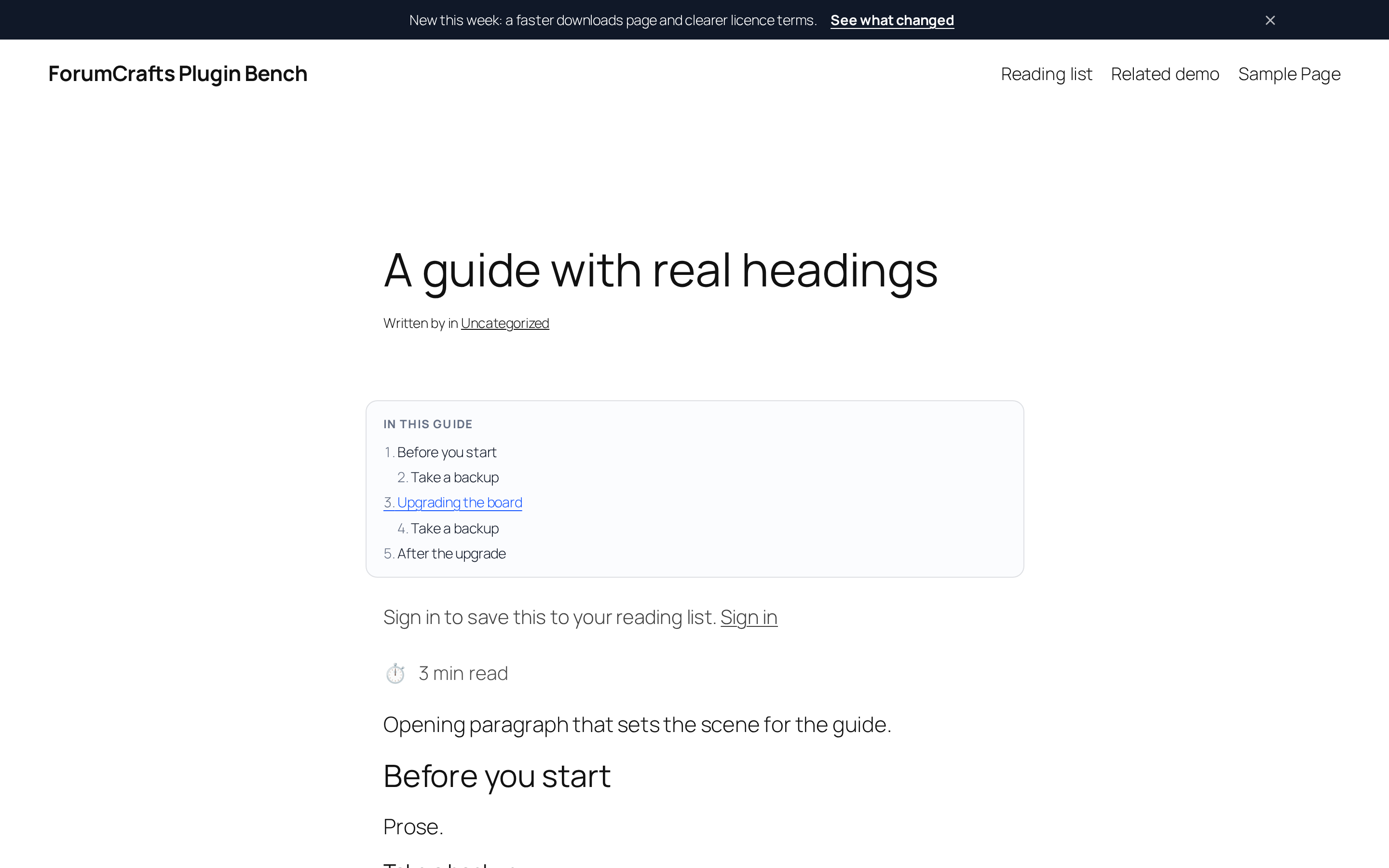
A table of contents built from the headings already in your post — real anchor links and a box that stays in view while the reader scrolls.
On desktop the box genuinely sticks: it stays in view while the reader scrolls, and it stops being sticky below 1100 px so it never covers text on a narrow screen. Entries with fewer headings than your minimum get no box at all, because a two-item contents list helps nobody.
Headings that already carry an id keep it, and two headings with the same text get a numeric suffix instead of pointing at the same place. The anchors are ordinary #fragment links, so a reader can share a link straight into a section.
Preview
 1 / 2
What's included
- Builds the box from H2 only, H2 + H3, or H2 to H4 — your choice, with numbered or plain entries and a title of your own.
- Genuinely sticky on desktop: the box stays in view while the reader scrolls, and becomes a normal block below 1100 px so it never covers text on a phone.
- A minimum heading count, so short entries get no box at all.
- Chooses the post types it runs on, above or below the content.
- Headings that already have an id keep it, and duplicate slugs get a numeric suffix instead of pointing at the same place.
At a glance
| Platform | WordPress plugin |
|---|---|
| Latest version | v1.1.1 |
| Download size | 16.5 KB |
| Released | 25 Oct 2026 |
| Downloads | 0 |
| Access | Free — sign in to download |
| Install | upload the zip and activate |
| Settings | Settings > DF Contents |
| Database | none — one option row, deleted on uninstall |
| Written to your content | nothing — ids are added at render time only |
| JavaScript | none |
| Licence | GPL-2.0-or-later |
Requirements
- WordPress 6.2 or newer, PHP 7.4 or newer. Tested on WordPress 7.1.3.
Checksum
Verify your download before you upload it to your board.
bae2778f5fd6a6be90152ddee80ca2833f5995dbfad037cdeeeafcfbefad3112Install it
2. Open Settings > DF Contents, pick the post types and how many headings a post needs before the box appears.
3. Write the entry as usual — the box is built from the headings that are already there, and every entry becomes a working #anchor.
4. Sticky positioning needs room beside the text, so below 1100 px the box sits in normal flow at the top of the entry.
5. To remove it: Deactivate, then Delete. Your posts were never modified.
Questions people ask
Q: Why is my box not sticky?
A: Sticky needs room beside the text. Below 1100 px the box becomes a normal block at the top of the entry — deliberately, because a sticky box over a phone-width column covers the text it links to. A theme wrapper with overflow:hidden also disables sticky positioning.
Q: Do the anchors survive if I deactivate the plugin?
A: No. The ids are added at render time and were never written to the database. That is the trade for leaving your content untouched.
Q: Does it work with headings from the block editor?
A: Yes. It reads the finished HTML, so headings from the block editor, the classic editor or a page builder all count as long as they are real h2–h4 elements.
Q: Can I choose which entries get a box?
A: Yes — by post type, and by a minimum number of headings.
Q: Does it send anything anywhere?
A: No external requests, and no JavaScript at all.
All releases
| Version | Released | Size | Downloads | Changelog |
|---|---|---|---|---|
| v1.1.1 latest | 25 Oct 2026 | 16.5 KB | 0 | 1.1.1 - Re-verified on WordPress 7.1.3 with PHP 8.4: installed, activated and exercised on a clean bench (front end, settings screen, the plugin's own behaviour) with WP_DEBUG on. No notices, warnings, deprecations or errors. readme.txt now declares Tested up to 7.1.3. |
| v1.1.0 | 25 Oct 2026 | 17.6 KB | 1 | Rebuilt as a complete plugin (1.1.0): a real settings screen under Settings > DF Contents, an uninstall.php, a text domain, a readme and GPL-2.0-or-later in the header. The box is now genuinely sticky on desktop (CSS position: sticky, admin-bar aware) — the old version printed a static, collapsed block. Heading levels, numbering, minimum heading count, position and post types are settings now. Keeps an id that already exists on a heading and de-duplicates collisions. |
| v1.0.0 | 24 Oct 2026 | 13.2 KB | 1 | - First ForumCrafts release of this plugin. - Built for the platform version listed on the product page. |
Ratings & reviews
Ratings come from registered members only — that is the whole point.
Sign in to rateFree account, 20 seconds. Create one